
Xdebug helps to set the breakpoints in our codes and easily we can see all define variables and even change them while running the code. In this blog post, I will demonstrate how to set up xdebug for xampp with php.
STEP 01
We have to download the xdebug https://xdebug.org/download.php. You have to choose the right version for your installed PHP version.
here, I’m listing some latest xdebug version’s links for you,
php 7.0 => https://xdebug.org/files/php_xdebug-2.5.5-7.0-vc14.dll
php 7.1 => https://xdebug.org/files/php_xdebug-2.5.5-7.1-vc14.dll
php 7.2=> https://xdebug.org/files/php_xdebug-2.6.0-7.2-vc15.dll
php 7.3 => https://xdebug.org/files/php_xdebug-2.7.0-7.3-vc15.dll
STEP 02
Then, copy the installed xdebug file[ php_xdebug-2.7.0–7.3-vc15.dll -this version file for my PHP verson] and paste it in to C:\xampp\php\ext
STEP 03
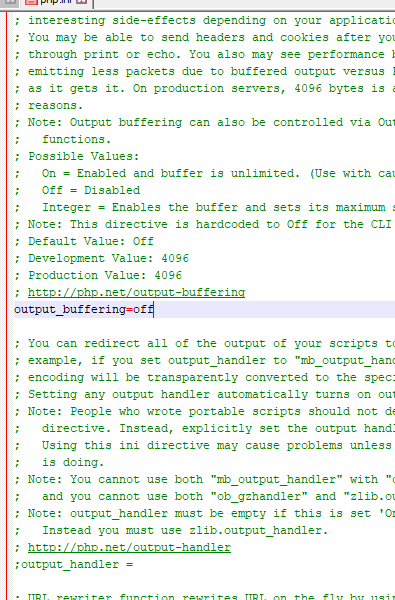
Then, we need to open the file C:\xampp\php\php.ini with a code editor and need to make the following
In php.ini file we should disable output_buffering=off
STEP 04
And, scroll down the bottom of the php.ini file and copy and paste the following code.

[XDebug]
zend_extension = "c:\xampp\php\ext\php_xdebug-2.6.0–7.3-vc15.dll"
xdebug.remote_autostart = 1
xdebug.profiler_append = 0
xdebug.profiler_enable = 0
xdebug.profiler_enable_trigger = 0
xdebug.profiler_output_dir = "c:\xampp\tmp"
;xdebug.profiler_output_name = "cachegrind.out.%t-%s"
xdebug.remote_enable = 1
xdebug.remote_handler = "dbgp"
xdebug.remote_host = "127.0.0.1"
xdebug.remote_log = "c:\xampp\tmp\xdebug.txt"
xdebug.remote_port = 9000
xdebug.trace_output_dir = "c:\xampp\tmp"
;36000 = 10h
xdebug.remote_cookie_expire_time = 36000
STEP 05
Restart your Apache server.
STEP 06
If everything went well then you will be able to set up a breakpoint as follow in your code and can see the xdebug in action in the PHPSTORM console

Things Need To Be Consider:
Sometimes if you still have an error check your PHP ini that, the file have an additional zend_extension code, u need to comment or delete them.
([opcache]
;zend_extension=php_opcache.dll
;opcache.enable=1)
#PHP
#Xdebug
#Xampp
#Windows 10
#Phpstorm
Leave a Reply